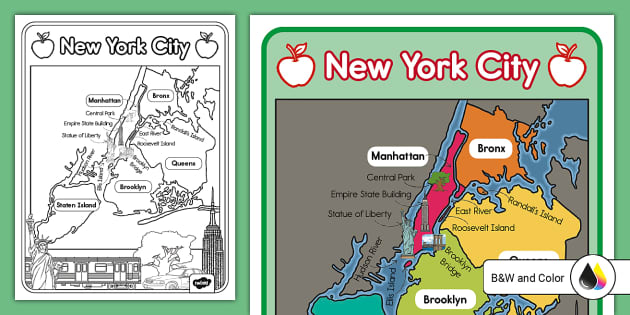
With thousands of stations and tens of thousands of bikes spread across Manhattan, Brooklyn, Queens, the Bronx, and Jersey City, the network is vast. Whether you are commuting to work, exploring Central Park, or simply trying to get across town during rush hour, knowing how to read the live map can save you time and frustration. This guide provides a deep dive into using the map effectively, planning routes, and managing your rides.
Accessing the Real-Time Map
The first step to utilizing the system is knowing where to look. The static maps found at physical kiosks are helpful for immediate orientation, but the system is dynamic. Bikes move constantly, and stations fill up or empty out within minutes. Therefore, digital tools are essential for a seamless experience.
The Official Citi Bike App: This is the primary tool for most riders. Available on iOS and Android, the app provides a real-time map showing every docking station in the network. It uses color-coding to indicate bike availability and dock space, which is crucial for planning both the start and end of your journey.
The Lyft App: Since Lyft operates Citi Bike, you can also view the map and rent bikes directly through the Lyft application. This is particularly convenient for users who already have the Lyft app installed for ridesharing purposes, allowing for a unified transportation interface.
Web Browser Map: For desktop planning before you leave your home or hotel, the official Citi Bike website hosts a live station map. This is often easier to view when planning complex routes or exploring new neighborhoods on a larger screen.
Decoding Map Symbols and Icons
When you first open the City Bikes New York map, you will see a sea of pins. Understanding what these specific icons mean is vital for avoiding stranded situations where you cannot find a bike or an empty dock.
- Blue Pins: These represent stations with available bikes. The number inside the pin usually indicates the quantity of bikes available.
- Grey Pins: These indicate a station that is either empty (no bikes to rent) or full (no docks to park), depending on your filter settings.
- Lightning Bolt Icon: This specifically denotes the availability of electric bikes (e-bikes). These are pedal-assist bikes that make conquering bridges and long distances significantly easier.
- Valet Icon: In high-traffic areas during rush hour, you may see a valet icon. This means Citi Bike staff are present to help manage bike intake, ensuring you can always dock your bike even if the physical docks are full.
Coverage Areas: Where Can You Ride?
The City Bikes New York map has expanded significantly since its inception. Originally limited to Manhattan below 59th Street, the network now covers a massive footprint. Understanding these boundaries is important to avoid riding out of the service area, which can result in hefty fines if the bike is not returned to a dock.
Manhattan: The coverage in Manhattan is extremely dense. From the Battery up to Harlem and Washington Heights, you will rarely walk more than a few blocks without encountering a station. This density makes it the most reliable mode of transit in the borough.
Brooklyn and Queens: The map has grown extensively into Brooklyn (Williamsburg, DUMBO, Bed-Stuy, Park Slope, and beyond) and Western Queens (Long Island City, Astoria, Sunnyside). While stations are slightly more spread out than in Midtown Manhattan, the network is robust enough for reliable commuting.
The Bronx and Jersey City: Expansion into the Bronx is ongoing, targeting key transit hubs. Additionally, the system extends across the Hudson River into Jersey City and Hoboken, allowing for interstate connectivity via the PATH train or ferries, though you cannot dock a generic NYC bike in New Jersey if the systems are not synced (always check the specific app for cross-state rules).
Planning Your Route with the Map
Finding a bike is only half the battle; finding a safe route is the other. New York City traffic can be intimidating, but the city has invested millions in protected bike lanes. When using the City Bikes New York map in conjunction with navigation tools, prioritize safety.
Many riders use the Citi Bike app to locate a bike and then switch to Google Maps or Citymapper for navigation. Both services have specific ‘cycling’ modes that prioritize streets with dedicated bike lanes and greenways. Look for the solid green lines on the map—these indicate protected paths away from cars.
Top Scenic Routes on the Map
If you are riding for leisure rather than commuting, the map reveals some spectacular corridors that offer sightseeing without the stress of traffic.
1. The Hudson River Greenway
Running the entire length of Manhattan’s west side, this is the busiest and most scenic bike path in the United States. You can pick up a bike near Battery Park and ride all the way to the George Washington Bridge (the Little Red Lighthouse) almost entirely uninterrupted by traffic lights.
2. Central Park Loop
The Central Park drives are car-free, making them a paradise for cyclists. Using the map, locate a station at Columbus Circle or Grand Army Plaza to dock your bike before entering, or grab a bike to ride the full 6-mile loop. Be mindful of the park’s specific rules regarding direction and speed.
3. Brooklyn Bridge Park
For skyline views, consult the map for stations near DUMBO or Brooklyn Heights. Riding along the waterfront piers offers breathtaking views of Lower Manhattan and the Brooklyn Bridge.
Understanding Pricing and Memberships
Before unlocking a bike found on the map, you should understand the cost structure to avoid surprise charges. Citi Bike offers several tiers suited for different types of users.
Single Rides: Perfect for tourists or one-off trips. You pay a set unlock fee plus a per-minute charge. This can get expensive for long rides, so keep an eye on the time.
Day Passes: This option allows for unlimited 30-minute rides within a 24-hour period. It is crucial to dock the bike every 30 minutes to reset the timer; otherwise, overtime fees accrue.
Annual Membership: For residents, this is the most economical choice. It removes unlock fees and grants unlimited 45-minute rides on classic bikes. Members also receive discounted per-minute rates on e-bikes.
How to Use the System: Unlock, Ride, Dock
Once you have located a station on the City Bikes New York map, the process is straightforward. To unlock, scan the QR code on the handlebars using the app. Wait for the light to turn green and the click sound, then lift the seat to release the bike.
When you arrive at your destination, consult the map to ensure there are open docks. Push the bike firmly into the dock. Wait for the green light. This is the most critical step. If you do not see a green light, the ride has not ended, and you will continue to be charged. Always pull on the bike to ensure it is locked before walking away.
Troubleshooting: Full Docks and Broken Bikes
Even with a live map, issues arise. A common scenario is arriving at your destination only to find the station completely full. If this happens, do not panic.
Go to the kiosk at the station and select ‘Time Credit’ or use the app to request more time. The system will typically grant you an extra 15 minutes of free riding time to travel to the nearest station with open docks, which you can find using the live map.
If you unlock a bike and realize it has a flat tire or mechanical issue, dock it immediately (within a minute or two) at the same station. Press the wrench button on the dock (if available) or report it via the app so the system knows the bike is broken and does not charge you for a full ride.
Safety Tips for NYC Riding
New York is a high-energy environment. Always ride with traffic, not against it. Obey all traffic lights—cyclists are subject to the same laws as vehicles. While helmets are not mandatory for adults (though highly recommended), they are required for children and working cyclists.
Furthermore, watch out for ‘dooring’—when a driver in a parked car suddenly opens their door into the bike lane. Stay alert, avoid wearing noise-canceling headphones, and use the bell on your Citi Bike to alert pedestrians.
The Future of the Network
The City Bikes New York map is not static; it is in a constant state of evolution. The Department of Transportation and Lyft are continuously working on ‘Phase 3’ expansions, aiming to double the service area and triple the number of bikes. This means more stations in upper Manhattan, the Bronx, and deeper into Brooklyn and Queens, eventually creating a truly city-wide network.
Conclusion
The City Bikes New York map is more than just a navigational tool; it is a passport to the city. By mastering the app, understanding the docking logic, and planning your routes along protected greenways, you can experience New York City in a way that is healthy, efficient, and exhilarating. Whether you are commuting to Wall Street or cruising through Prospect Park, the blue bikes are ready to roll.