Iterating over a Map can be done in several ways, each with its own advantages regarding readability, performance, and functionality. Choosing the right method depends heavily on your specific requirements: Do you need just the keys? Do you need both keys and values? Do you intend to modify the map during iteration? In this comprehensive guide, we will explore every technique available to a Java developer, ranging from legacy approaches to modern Java 8+ functional paradigms.
1. Understanding the Map Interface Architecture
Before diving into the code, it is crucial to understand why we cannot simply write for (Object o : map). The Map interface represents a mapping between a key and a value, not a linear sequence of elements. Consequently, to iterate over a Map, we must first obtain a Collection view of the Map. Java provides three primary collection views for this purpose: the set of keys, the collection of values, and the set of key-value mappings.
2. The Gold Standard: Iterating via entrySet()
If you need access to both the key and the value, the most efficient and common method is using the entrySet() method. This method returns a Set<Map.Entry<K, V>>, which acts as a bridge to the underlying data.
Using a standard for-each loop on the entry set is widely considered the best practice for general iteration. It is efficient because you retrieve the key and value in a single operation without the overhead of performing a secondary lookup (hashing) to get the value associated with a key.
3. Iterating Using keySet() and values()
Sometimes, you do not need the full pairing. If your logic only requires the keys, you should use the keySet() method. This returns a Set of all keys in the map. Iterating over this set is syntactically identical to iterating over any standard Java Set.
Conversely, if you only care about the values and the keys are irrelevant to the current operation, the values() method is your solution. It returns a Collection of values. Note that this returns a Collection rather than a Set because values in a Map do not have to be unique.
Warning: A common anti-pattern is iterating over the keySet() and then calling map.get(key) inside the loop to retrieve the value. This is significantly less efficient than using entrySet() because the get() operation requires the map to calculate the hash code and look up the bucket for every single element, doubling the work required.
4. The Classic Approach: Using the Iterator Interface
Before the introduction of the enhanced for-loop in Java 5, the explicit Iterator was the only way to traverse collections. While it may look verbose today, understanding the explicit Java iterator map technique is vital for one specific scenario: removing elements during iteration.
If you attempt to remove an item from a Map inside a standard for-each loop, you will almost certainly trigger a ConcurrentModificationException. This happens because the iterator created implicitly by the for-loop detects that the underlying structure has changed without its knowledge.
How to Safely Remove Elements
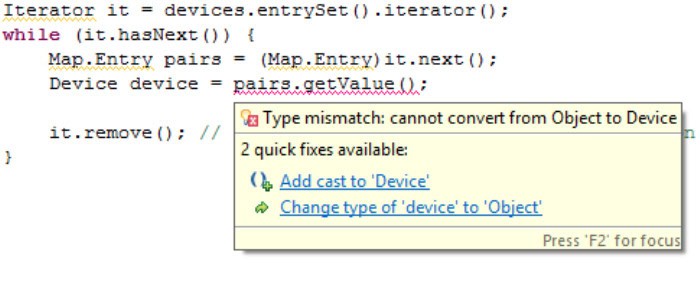
To remove elements safely, you must obtain the Iterator instance explicitly from the entrySet(). As you loop using iterator.hasNext() and iterator.next(), you can call iterator.remove() to delete the current entry. This method updates the iterator’s state, preventing the exception and ensuring the map integrity is maintained.
5. Modern Java: forEach and Lambda Expressions
With the advent of Java 8, the syntax for iteration became significantly more concise. The Map interface now includes a default forEach method that accepts a BiConsumer functional interface. This allows you to write elegant, one-line iterations using Lambda expressions.
The syntax map.forEach((k, v) -> System.out.println(k + v)); eliminates the boilerplate of setting up loops and entry objects. Internally, this method usually delegates to entrySet() iteration, so performance is comparable to the standard for-loop, but the readability is vastly improved for simple operations.
6. The Power of Java Streams API
For more complex processing, the Java Stream API provides a robust framework. By calling map.entrySet().stream(), you gain access to the full power of functional programming, including filter, map, reduce, and collect.
Streams are particularly useful when you need to perform aggregations or transformations. For example, you can filter a map to find all entries with a value greater than a specific threshold and then collect just the keys into a new List. While Streams might introduce a slight overhead compared to a simple loop, the gain in expressiveness and the ability to easily parallelize the operation (via parallelStream()) often outweighs the cost.
7. Handling ConcurrentModificationException
One of the most frequent errors developers encounter when working with a java iterator map is the ConcurrentModificationException. This exception is thrown by the iterator’s fail-fast mechanism. It serves as a safeguard, indicating that the map was modified (items added or removed) by a thread or code path other than the iterator’s own remove method.
To avoid this in multi-threaded environments, you should consider using ConcurrentHashMap. This implementation is designed for high concurrency and allows safe iteration even while other threads are modifying the map. Iterators returned by ConcurrentHashMap are weakly consistent; they will not throw an exception, but they may or may not reflect updates that occur after the iterator was created.
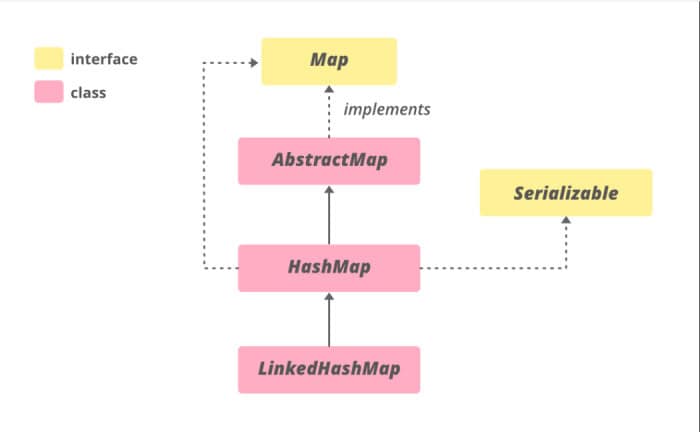
8. Iteration Order: HashMap vs. TreeMap vs. LinkedHashMap
- HashMap: Makes no guarantees about the order of the map. The order can even change over time if the map is resized.
- TreeMap: Iterates according to the natural ordering of its keys, or by a Comparator provided at creation time.
- LinkedHashMap: Iterates in the order in which entries were inserted (insertion order) or last accessed (access order), making it predictable.
9. Performance Considerations
When dealing with small maps, the performance difference between these methods is negligible. However, in high-latency applications or when processing maps with millions of entries, the choice of iterator matters.
Generally, the entrySet() loop and the forEach() method (Java 8) are the most performant for standard traversal. The Stream API may incur a small setup cost due to object creation. The keySet() loop followed by get() is universally the slowest and should be avoided in performance-critical sections.
10. Common Questions (People Also Ask)
Can I iterate over a Map in reverse?
The standard Map interface does not support reverse iteration directly. However, if you are using a TreeMap or a LinkedHashMap, you can achieve this. TreeMap provides the descendingMap() method, which returns a view of the map in reverse order. For a standard HashMap, you would typically need to copy the keys to a list and reverse the list, which is inefficient.
How do I convert a Map to a List?
Since a Map has two components (keys and values), you cannot convert it to a single list directly. You must choose to convert the keys (new ArrayList(map.keySet())), the values (new ArrayList(map.values())), or the entries (new ArrayList(map.entrySet())).
11. Best Practices Summary
-
Use Java 8 forEach for concise, readable code when performing simple actions on keys and values.
-
Use entrySet() in a for-each loop for maximum performance on older Java versions or when raw speed is critical.
-
Use keySet() or values() only when you strictly need just the keys or just the values.
-
Use the explicit Iterator if you need to remove elements conditionally during the loop.
-
Use Streams for complex data processing, filtering, or mapping operations.
Conclusion
Mastering the java iterator map techniques is a staple skill for any Java developer. While the language has evolved from verbose explicit iterators to elegant functional streams, understanding the underlying mechanics ensures you can write code that is not only bug-free but also optimized for performance. Whether you are maintaining legacy systems or building cutting-edge microservices, choosing the right iteration strategy will lead to cleaner, more maintainable, and faster applications.